先上截图

写在前面
该功能需要用到接口→人生进度条
该功能需要API接口平台→API_KEY
代码分解
首先是参数获取部分
拼接参数
提交数据
解析json并取出进度数值
加载css样式
加载js代码
嵌入框架内容
输出内容
//参数模块
$key = '你的API_KEY';
$birthdate = '填写你的生日'; //格式示例:19910101
$color = '颜色名称,例如:blue'; //为空则是彩虹渐变色
//拼接参数
$url = 'https://api.xwteam.cn/api/life/progress?key='.$key.'&birthdate='.$birthdate;
$curl = curl_init();
curl_setopt($curl, CURLOPT_URL, $url);
curl_setopt($curl, CURLOPT_RETURNTRANSFER, true);
curl_setopt($curl, CURLOPT_HEADER, false);
curl_setopt($curl, CURLOPT_FOLLOWLOCATION, true);
curl_setopt($curl, CURLOPT_SSL_VERIFYPEER, false);
curl_setopt($curl, CURLOPT_SSL_VERIFYHOST, false);
$response = curl_exec($curl);
curl_close($curl);
$decode = json_decode($response);
$progress = $decode->data->Progress->progress;
<style>
  .progress-bar-container {
    width: 100%;
    background-color: #e0e0e0;
    border-radius: 10px;
    box-shadow: 0 1px 3px rgba(0, 0, 0, 0.2);
    margin: 20px 0;
    overflow: hidden;
  }

  .progress-bar {
    width: 0%;
    height: 20px;
    text-align: center;
    line-height: 20px;
    color: white;
    transition: width 0.4s ease-in-out;
  }
</style><script>
function setProgress(percent, color = 'green') {
var progressBar = document.getElementById('progress-bar');
progressBar.style.width = percent + '%';
progressBar.style.backgroundColor = color;
}
function animateProgress(targetPercent, color) {
let currentPercent = 0;
const interval = setInterval(function() {
if (currentPercent >= targetPercent) {
clearInterval(interval);
} else {
currentPercent++;
setProgress(currentPercent, color);
}
}, 20);
}
</script><div class="progress-bar-container"> <div id="progress-bar" class="progress-bar"></div> </div>
<?php echo '<script>
window.onload = function() {
  animateProgress('.$progress.','.'"'.$color.'"'.');
};
</script>'; ?>
写在最后
自己根据代码修改保存使用即可,样式就是文章顶部截图。就是一个进度条显示,自己放到有需要的地方即可。
如果确实懒的话,也可以直接调用我做好的,使用下面这个网址和参数即可:
https://api.xwteam.cn/api/life/life_bar?key=API_KEY&birthdate=出生日期&color=skyblue
| 名称 | 必填 | 类型 | 示例值 | 说明 |
|---|---|---|---|---|
| key | 是 | string | 您自己的APIKEY(注册账号后获得) | 接口密钥,在控制台->密钥管理查看 |
| birthdate | 是 | string | 19910101 | 出生日期,格式为:19910101 |
| color | 否 | string | skyblue | 为空则是彩虹渐变色 |
我这个和代码的略有不同,我这个不是直线型进度条,而且圆圈型进度条。
直接调用代码:
<div style="width: 100%; height: 220px; border: 0 solid #ccc; overflow: hidden;
padding: 0; margin: 0; box-sizing: border-box;">
  <iframe src="带参数的调用网址" style="width:100%; height:100%; border:none; overflow:hidden;
  padding: 0; margin: 0; box-sizing: border-box;" scrolling="no" oncontextmenu="return false;">
  </iframe>
</div>
预览图: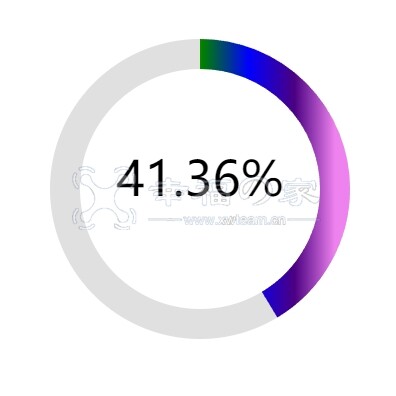
 粤ICP备16000487号
 粤公网安备44170202000132